AI design review: what it catches (and what it can't)
Hardware teams are adding AI to design reviews faster than they agree on what the term means. An AI design review reads a schematic, layout, or bill of materials, then checks it against datasheets and requirements and flags risks before fabrication. This guide explains what an AI design review catches, how it works, and its limits.
Key takeaways
- An AI design review checks each connection against datasheets and requirements, catching semantic errors that ERC and DRC checks are not built to find.
- AI reliably catches mismatched pins, component derating, missing decoupling capacitors, and power or grounding problems, then posts each as a traceable finding.
- A single board respin costs tens of thousands of dollars and delays a project by weeks to months, the outcome AI review aims to prevent.
- AI does not approve designs; approval stays an accountability decision an engineer owns, with a human in the loop for every judgment call.
What an AI design review actually means
An AI design review is a review step where AI reads a hardware design and checks it against component datasheets and requirements. It flags likely problems for an engineer to confirm. The AI runs a first pass and does not approve the design.
The design can be a schematic, a PCB layout, or a bill of materials (BOM). The AI points to the exact pin, net, or component behind each finding. An engineer then decides what to fix.
This differs from a traditional electrical rule check (ERC) or design rule check (DRC). Those tools test a design against fixed, preset rules. They confirm the structure is legal, but not whether a connection makes engineering sense.
Tools built for this, such as AllSpice's AI-powered design reviews, read the native design data instead of a screenshot. That lets the review reason about the actual circuit.
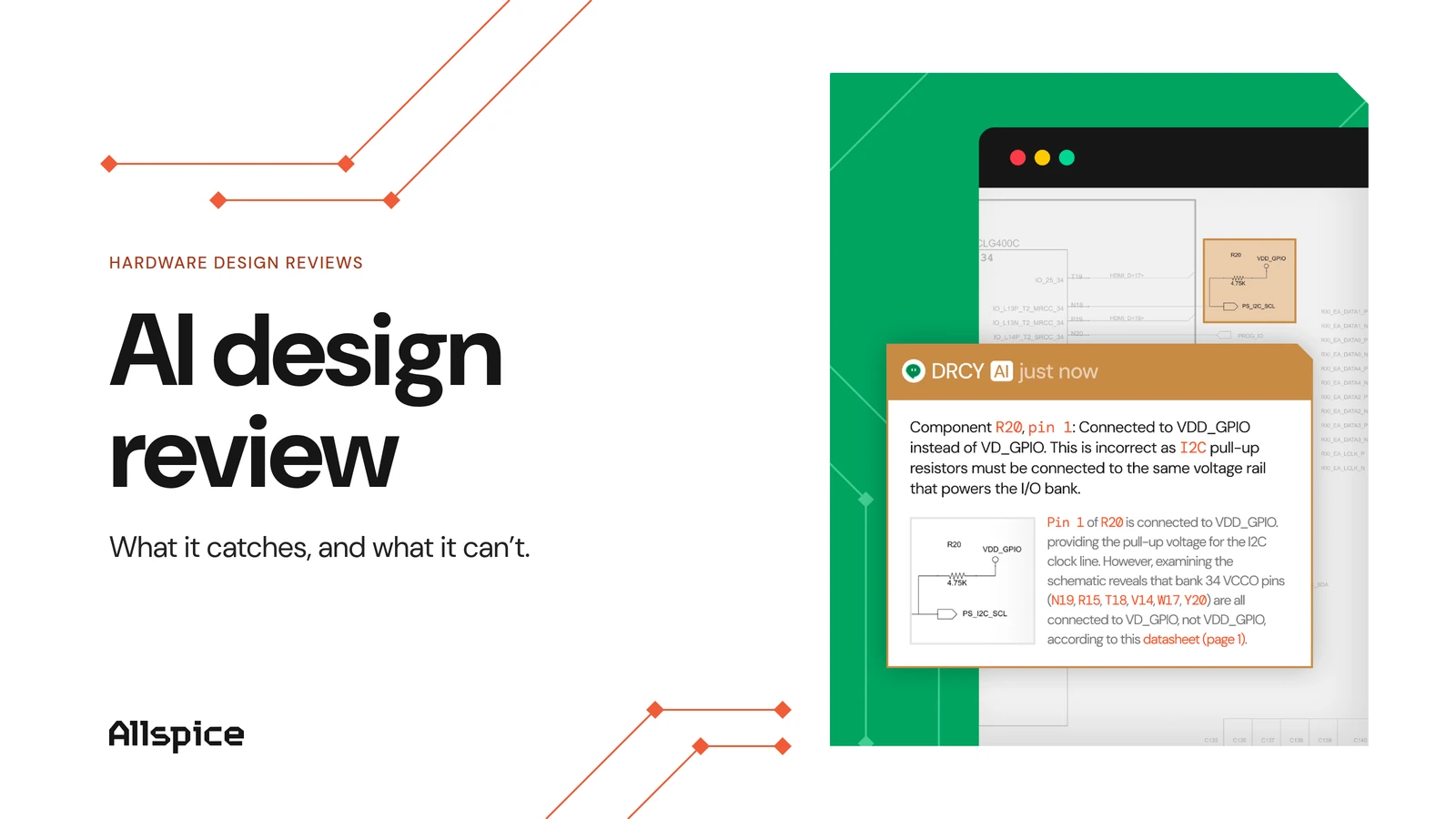
Here is a plain example. A 3.3 V output drives a pin rated for 1.8 V maximum. ERC sees a valid wire, while an AI design review reads both datasheets and flags the voltage conflict.
Why traditional design reviews miss errors
Manual review is careful work, but it does not scale. A reviewer may cross-check hundreds of components against datasheets that run past 100 pages. Under deadline pressure, the boring basics surface late.
The context also lives in people's heads. One engineer knows why a part was swapped, and the next reviewer does not. When that knowledge is missing, real issues slip through.
The escape rate is measurable. In the 2024 Wilson Research Group study, 87 percent of projects reported non-trivial bug escapes into production for FPGA designs.
A miss is expensive. Industry estimates put each board respin at tens of thousands of dollars per iteration and weeks to months of schedule delay. An AI design review aims to catch that error while it is still a comment on a schematic, before fabrication.
What an AI design review catches
A useful AI design review does four jobs. It checks meaning against datasheets, catches component and rating problems, tracks what changed, and leaves a record. The next sections cover each one.
Semantic correctness against datasheets
This is the highest-value catch. Structural checks confirm two pins are connected. Semantic checking confirms the connection is correct for those specific parts.
An AI design review reads the manufacturer datasheet and compares it to the schematic. It can spot a swapped TX/RX pair, or feedback resistors that set the wrong regulator output. These are the errors that pass ERC and fail on the bench.
AllSpice shares lessons from schematic reviews that show how often these basics hide under deadline pressure.
Component and rating problems
Many failures come from parts used outside their limits. An AI design review can flag these early.
- Missing or wrongly valued decoupling capacitors near a power pin
- Pull-up or pull-down resistors that are absent or set wrong
- Components run outside their rated voltage or current limits (derating)
- Power and grounding connections that route to the wrong domain
Each item is small on its own. Together they cause bring-up delays that are hard to trace.
Change detection across versions
A review should show what changed, not just the newest file. An AI design review compares revisions and groups related edits.
That turns a full file into a focused diff. Reviewers see the moved component or the altered net, not the whole board again. The review sits on top of an ECAD-agnostic revision control system built for hardware.
A traceable decision record
Every finding posts as an inline comment linked to the design and the datasheet. The record builds as the work happens.
Later, anyone can see why an issue was raised and how it was resolved. That audit trail helps with compliance and with the next review.
How an AI design review works under the hood
The steps are simpler than they sound. Most tools follow the same pipeline.
- Parse the ECAD file into structured data the model can read.
- Group components into functional blocks, like a power supply or a bus.
- Fetch and read the relevant component datasheets automatically.
- Review each block against its specs and the design requirements.
- Reconcile findings across runs, then post grouped comments on the review.
AllSpice explains how DRCY reviews schematics using a five-agent pipeline with autonomous datasheet retrieval and a multi-run consensus step for reliability. The datasheet retrieval and the multi-run check are what set a purpose-built tool apart from a general chatbot.
Where an AI design review fits in the engineering process
An AI design review is not a separate event. It runs at the points where you already check work.
Hardware teams gate work at a preliminary design review (PDR) and a critical design review (CDR). An AI design review adds value around both.
- Before PDR: check that requirements are covered and traceable
- Between PDR and CDR: run continuous checks on every change
- Before CDR: verify drawings and manufacturability details
- At each gate: keep the decision record with the design
It can run as a continuous check (CI/CD) that fires when a review is submitted, the same way tests run in software. This sits on top of a hardware engineering workspace with version control and audit trails.
How to run an AI-assisted design review
You do not need to change your whole process to start. Add the AI review to the flow you already run, then build from there.
1. Establish ground truth first
Put your requirements and constraints in one place, each with an owner. Without a source of truth, every downstream check is guesswork. This step matters more than the tool you pick.
2. Connect the AI to live design data
Point the review at your actual ECAD files and revision history. A stale export hides the very changes you need to catch. Live data lets the tool compare against the real design.
3. Run the AI review before the meeting
Generate the findings and a change summary as a pre-read. The meeting then starts at the real questions, not a cold read of the whole board. AllSpice offers practical steps to run hardware design reviews that stay targeted and contextual.
4. Order the agenda by risk
Discuss the highest-impact findings first, along with any requirement that has no matching design element. Low-risk items can be handled async. Time in the room is your scarcest resource.
5. Capture decisions against the design
Attach each decision to the component and the requirement it affects. That way the reasoning survives the handoff and feeds change control. The record also helps the next review start faster.
AI review vs manual review
An AI design review handles the exhaustive, repeatable checks at scale, which frees reviewers to focus on judgment and architecture.
.webp)
AI removes the completeness problem. The engineer still owns the decision.
What an AI design review cannot do
An honest view of the limits matters. An AI design review is a first pass, not a sign-off.
- It cannot approve a design; a human owns that accountability
- It has no physical intuition for heat, vibration, or feel
- It cannot invent ground truth that is missing from the data
- It is only as current as its datasheet and design integrations
- It cannot fix a broken review process on its own
AllSpice explains why AI needs design intent: without the reasoning behind a change, the tool can flag a deliberate exception as an error.
Where the real gains come from
The shift is smaller than the hype suggests, and more useful. A traditional check confirms a design is legal: pins connect and the rule set passes. An AI design review asks the harder question of whether the design is correct for the exact parts on the page, measured against their datasheets, at review time instead of at the bench.
That is where the value sits. The gains come from grounding the AI in a team's own requirements and revision history, so its findings reflect the real board. A general model pointed at a screenshot guesses. A reviewer that reads the native design and the datasheet behind each part has something to stand on.
The meeting changes too. Once the mechanical cross-checking is already done, the human time goes to judgment and the trade-offs that carry real risk. The engineer still owns the decision, and a review is only as honest as the requirements behind it. Get those right, and the expensive respin becomes a comment on a schematic.
FAQs
What does an AI design review catch that a manual review misses?
It reliably catches semantic errors, where a connection is legal but wrong for the specific parts. Examples include a swapped TX/RX pair or a regulator whose feedback resistors set the wrong output voltage.
Can AI replace a design review meeting?
No. An AI design review handles first-pass checks and creates a pre-read, so the meeting can focus on judgment and open questions. A human still runs the review and approves the design.
How does an AI design review work with PDR and CDR?
It runs continuously between the gates and checks each change as it happens, then confirms requirements coverage and manufacturability before the formal PDR and CDR. Each finding stays attached to the design as part of the gate record.