ECAD version control: what your schematic history needs (beyond file storage)
Many hardware teams still track design changes with numbered folders, file renames and email threads. Moving to stock Git doesn't fix it, because Git can't show what changed inside a binary schematic. This guide compares the four approaches to ECAD version control and what each one can actually see. It ends with six steps for making every design change reviewable before it reaches a release.
Key takeaways
- ECAD version control keeps a reviewable history of schematics, PCB layouts, BOMs and libraries, tracing each change to its author and reason.
- Stock Git stores binary or proprietary ECAD formats but cannot show a readable diff or merge them. Git LFS adds large-file storage and locking.
- The four common approaches are folder naming conventions, Git with Git LFS, PDM or PLM vaults, and hardware version control software built for ECAD.
- Useful ECAD version control pairs revision history with visual diffs and design reviews, then hands only approved releases to PLM.
Why ECAD files break ordinary version control
ECAD version control is the practice of keeping a complete, reviewable history of your electronic design files. Every change to a schematic, PCB layout, BOM or library is recorded with its author and reason, and any two revisions can be compared.
Software version control was built around text. Git compares files line by line, which works for source code and falls apart for binary or proprietary ECAD formats.
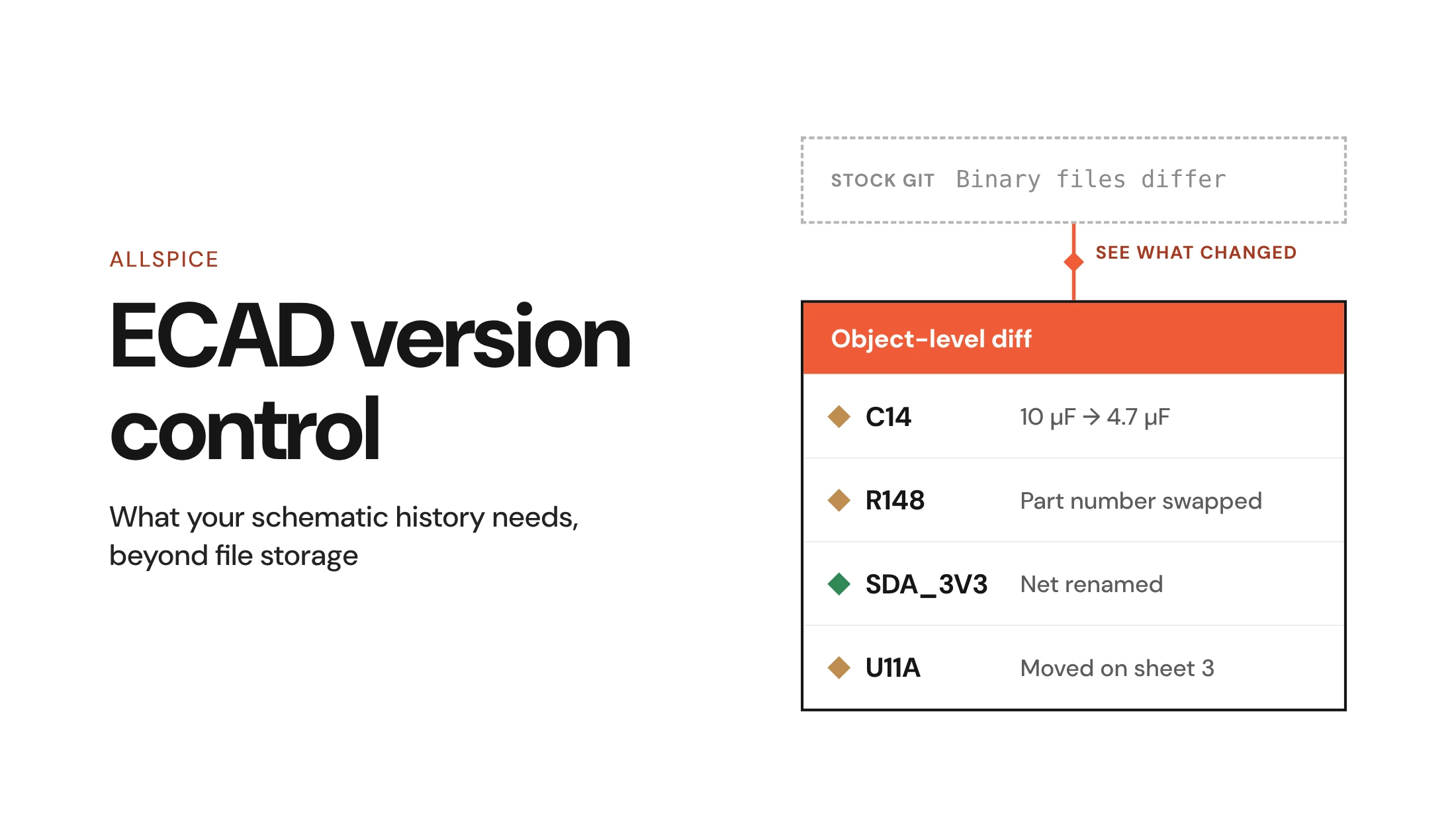
The Git project's Git binary file handling docs say Git will "generate Binary files differ (or a binary patch, if binary patches are enabled) instead of a regular diff." The commit log records that the schematic file changed. Finding out which part or net changed means opening both versions side by side.
A meaningful diff for a schematic reports changes to design objects. For example:
- A part moved, such as U11A shifting to a new spot on sheet 3.
- A value changed, such as C14 going from 10 uF to 4.7 uF.
- A net was renamed, such as I2C_SDA becoming SDA_3V3.
- A part number was swapped on R148 while the symbol stayed identical.
Some teams work around binary files with text-conversion diff drivers that export a readable view. Those views are one-way. You can read them, but you can't merge from them or push edits back into the design file.
The four approaches to ECAD version control
Every approach to ECAD version control below stores your files. They differ in how much of the design's meaning they can see, which decides whether a reviewer can tell what changed without opening both revisions.
The order runs from least visibility to most. Most teams have used the first one at some point.
Folder copies and naming conventions
The most common starting point is a shared drive. Designs live in numbered folders or get renamed Rev A, Rev B and onward, and handoffs happen over email with files attached.
This before-state is common on hardware teams. It usually comes with a hand-written change note telling the next engineer what moved.
The setup costs nothing, and anyone can follow it. The cost shows up later, because there is no diff, so the change note is the only record of intent. That note is only as complete as the engineer who wrote it at 6 p.m. before a build.
Parallel work is also unprotected. Two engineers can edit copies of the same board, and nothing warns them until someone compares folders by hand. Over time, the real history lives in tribal knowledge more than in the files.
Git with Git LFS and file locking
Many teams move to Git next, usually with Git LFS for the large binaries. Git LFS, from the Git Large File Storage project, "replaces large files such as audio samples, videos, datasets, and graphics with text pointers inside Git."
Locking is the part that matters most for ECAD. Per the Git LFS project's Git LFS file locking guide, "Concurrent edits in Git repositories will lead to merge conflicts, which are very difficult to resolve in large binary files." For binary design files, the workable rule is one owner per file at a time.
Git LFS file locking only protects you when the setup enforces it. The server must support the LFS locking API, and lock verification must be on. In the Git LFS project's Git LFS lock settings, the locksverify option "prevents you from pushing changes to files that other users have locked."
What Git with LFS still lacks is a readable diff. Branches give you history, but a branch of a binary schematic is a private copy that can't be merged back automatically. Our guide to Altium project version control walks through this setup for one proprietary format.
PDM and PLM vaults
Product data management (PDM) and product lifecycle management (PLM) systems add check-in, check-out, lifecycle states and part numbers. They are a strong system of record for released data that manufacturing and purchasing need to trust.
For daily design iteration, they are heavy. PLM vaults typically track files and lifecycle state, but they do not show object-level diffs of schematic changes.
The pattern that holds up is keeping daily change out of PLM until it's ready, then handing over an approved release. We cover that handoff in our post on ECAD and PLM integration.
In Allspice, the review before that handoff shows attribute-level changes, so a swapped part number on R148 appears in the schematic and BOM comparison. Once a release is approved, Allspice syncs it to PLM or ERP through its REST API.
Hardware version control software built for ECAD
The fourth approach is software that opens native ECAD files and understands the objects inside them. Allspice is one example of a hardware revision control platform. Allspice is ECAD-agnostic and works with native Altium, OrCAD, Cadence and KiCad files.
Teams get commits and branches, with design reviews tied to specific revisions. A visual diff for schematics answers the reviewer's first question directly. Allspice shows visual schematic and PCB diffs at the object level. In Allspice, new objects are marked green, deleted ones red and changed ones yellow.
This approach has limits worth stating. A diff tells a reviewer what changed, and deciding whether the change is right still takes an engineer who knows the circuit. It also doesn't replace PLM, which remains the system of record for released parts.
How the four approaches compare
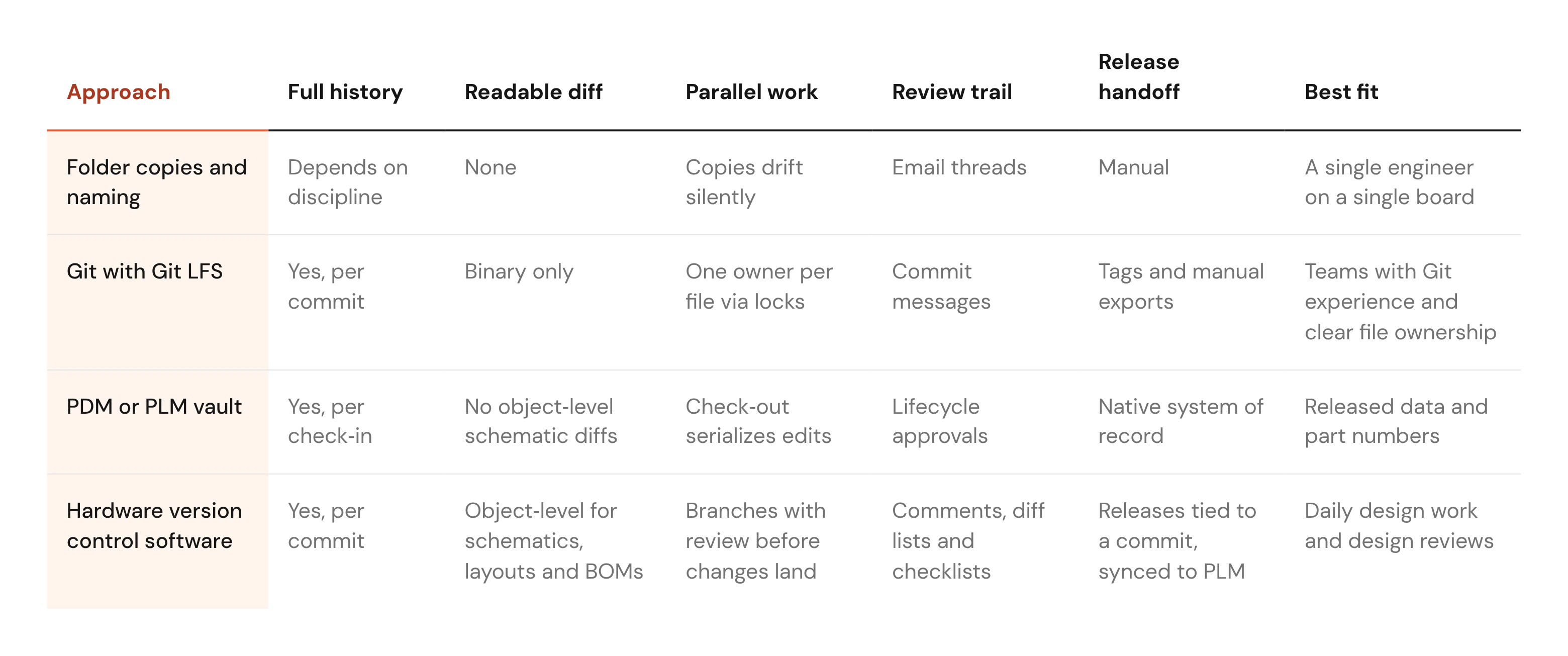
In practice, many teams pair two of these, and it's the setup we recommend. A revision layer handles daily work, and PLM holds the released data.
How to set up ECAD version control on your team
These six steps for ECAD version control assume you already run design reviews and want the history behind them to be complete. Most teams work through them one product at a time.
1. Inventory your design files and tools
List every file type that defines a board: schematics, layouts, BOMs, libraries and the outputs you send to fab. Note every ECAD tool in use, including the one a contractor uses for a single legacy board.
Separate source files from generated outputs. Gerbers, drill files, pick-and-place files and PDFs are produced from the source, so they belong in releases rather than in day-to-day history.
The inventory also shows where your current history lives. If the answer is a mix of shared drives and one engineer's memory, you know what you're replacing.
2. Put native source files under one revision history
Commit the native files in the format your ECAD tool saves. Exports and screenshots lose the object data that makes a diff readable.
Use one repository per product or board, and keep libraries alongside the designs that depend on them. A symbol change in a shared library is a design change too.
Import the last released revision first, so history starts from a known baseline. Older numbered folders can be archived as they are.
3. Decide how parallel work happens on binary files
Binary or proprietary ECAD formats can't be merged line by line. Decide up front how two engineers avoid editing the same file, and write the rule down.
The first pattern is ownership. One engineer holds the schematic or the layout at a time, enforced by locks. If you rely on Git LFS file locking, confirm that the server supports the locking API and that verification is on.
The second pattern is branching for exploration. An engineer can try a new regulator on a branch, and the team reviews the diff before deciding whether it replaces the main design. Many teams use both patterns.
4. Review every change as a visual diff before it merges
Make the diff the starting point of every design review. Your reviewers already know what to look for, and the diff gives them a complete list of where to look.
In Allspice, design reviews run in the browser. Reviewers comment on design objects and work through the diff list with review checklists.
Keep each review tied to the revision it covers. When a reviewer flags C14, the comment should point to the commit where C14 changed. Our step-by-step revision control workflow shows how review connects each change to a release.
5. Automate checks on each push
Some checks are rules-based and repeatable, and nobody should redo them by hand on every revision. Allspice Automations run when someone pushes a change or opens a design review.
With automated hardware design checks, Automations review component attributes, compare parts against the approved vendor list, flag lifecycle or availability problems and generate release packages. An end-of-life regulator gets caught at push time instead of at the purchasing stage.
Start with the check your team runs by hand most often. Automate that one, watch the results over a few reviews, then add the next. Automations clear rote work so reviewers can focus on the circuit, and the judgment stays with the engineer.
6. Cut releases and send only approved data to PLM
A release should point to one exact state of the design. In Allspice, Releases are tied to a specific commit or design review. For release numbering and contents, see our guide on managing hardware design releases.
Only approved releases should reach PLM or ERP. That way purchasing and manufacturing see the released state without the work in progress.
Version history is only useful when someone can read it
The problem with most ECAD version control setups is a history that records a file changed and hides what changed inside it. Every approach above stores files. The real difference is whether a reviewer can see the design behind them.
No tool replaces ownership discipline. Someone still decides who holds the layout this week. A diff still needs an engineer to judge whether moving C14 hurt the decoupling on U7.
Teams choosing ECAD version control are adopting the parts of software practice that fit, such as reviewable history and automated checks. Line-by-line merging of binary files stays out of the workflow. If you're looking for ECAD version control, start with one test: can your setup show what changed between your main board's last two revisions?
FAQs
What is ECAD version control?
ECAD version control records every revision of your schematics, PCB layouts, BOMs and libraries, with the author and reason for each change. Good systems also let you compare revisions visually and tie each change to a design review.
Can I use Git for ECAD files?
Yes, Git with Git LFS can store and lock binary or proprietary ECAD formats, if the server supports locking and verification is on. Stock Git can't show a readable diff of those files or merge them, so reviewers still need another way to see what changed.
What is the difference between ECAD version control and PLM?
ECAD version control tracks daily design changes and reviews, while PLM manages released data such as part numbers and lifecycle states. Most teams use both, sending only approved releases from the revision layer into PLM.