AI design assistants for hardware engineers (what a good one actually does)
Search results for “AI design assistants” are mostly tools for UI mockups and marketing graphics. Hardware needs something different. A good AI assistant for hardware checks your schematics against every part's datasheet and cites the page behind each finding, so you can verify it fast. This post covers what to look for and how to bring one into your next schematic design review.
Key takeaways
- In hardware, an AI design assistant reads component datasheets and checks the schematic against the limits those parts impose.
- It acts as a first-pass reviewer. Senior engineers still review; they just start from a shorter list.
- Every finding should cite the datasheet page behind it. You check the reasoning, not the verdict.
- Today, AI design review covers schematics. Layout checks (trace widths, clearances, impedance and DFM) are a separate problem.
Why this matters now
AI use is now routine. Per McKinsey State of AI 2025, "88% of organizations report regular AI use in at least one business function, compared with 78% a year ago."
The hardware question is more specific: what should an assistant do with a schematic that is built with over 40 distinct components, each with its own absolute maximum ratings and recommended values?
Our position is that the right assistant does the exhaustive datasheet reading that doesn’t fit in a review cycle, and it shows the evidence for every claim. That’s the premise behind Allspice's work on bringing AI into hardware reviews.
What an AI design assistant does in hardware
It reviews a schematic against the datasheets of the parts in it. It flags part ratings, component values, connections and net names that conflict with a datasheet’s guidance. Each flag cites the datasheet page that sets the limit.
That job differs from what UI assistants do. A UI assistant generates new output from a prompt. A hardware review assistant checks what an engineer already drew. It assumes the circuit is intentional and asks a narrower question: does every part sit inside the limits its own datasheet sets?
Our customers call this the first pass. The assistant raises findings before senior reviewers open the design, and those reviewers still make the call. At Allspice, DRCY is that AI design review agent, running inside a platform for Design Reviews, visual diffs, Automations and Releases.
The expensive errors are the ones that survive review. A pin swap turns up at bring-up after days of probing, or forces a re-spin after fab, long after the engineer who drew the circuit has moved on to the next board.
The checklist comes from your parts
Most teams already run design reviews against a checklist, and those reviews are rigorous. The limitation is structural: a fixed list only catches what someone already thought to write down.
A hardware assistant builds its checklist from the parts in the design. A level translator brings its own supply limits. A regulator brings its enable-pin behavior and its recommended output capacitance.
Each part adds the checks its datasheet implies, and the assistant follows nets across components to do the calculations those checks need. Allspice covers why checklists miss errors in more depth.
Four kinds of errors an AI design assistant catches in schematic design review
The findings below come from real customer design reviews, anonymized. Each maps to a check that a careful, page-by-page human review struggles to complete across a full design.
Ratings against the rail
In one customer design, ESD diodes rated 3.3 V sat on a 4.6 V level translator. Each part looked reasonable on its own. The problem only appears when you compare the diode rating to the rail it protects.
Another review found 6.3 V capacitors on a 5 V rail, a margin that passes a quick look. Whether that margin holds depends on the capacitor's datasheet and your derating rules. A reviewer should make that call with the finding in hand.
Values that contradict the datasheet
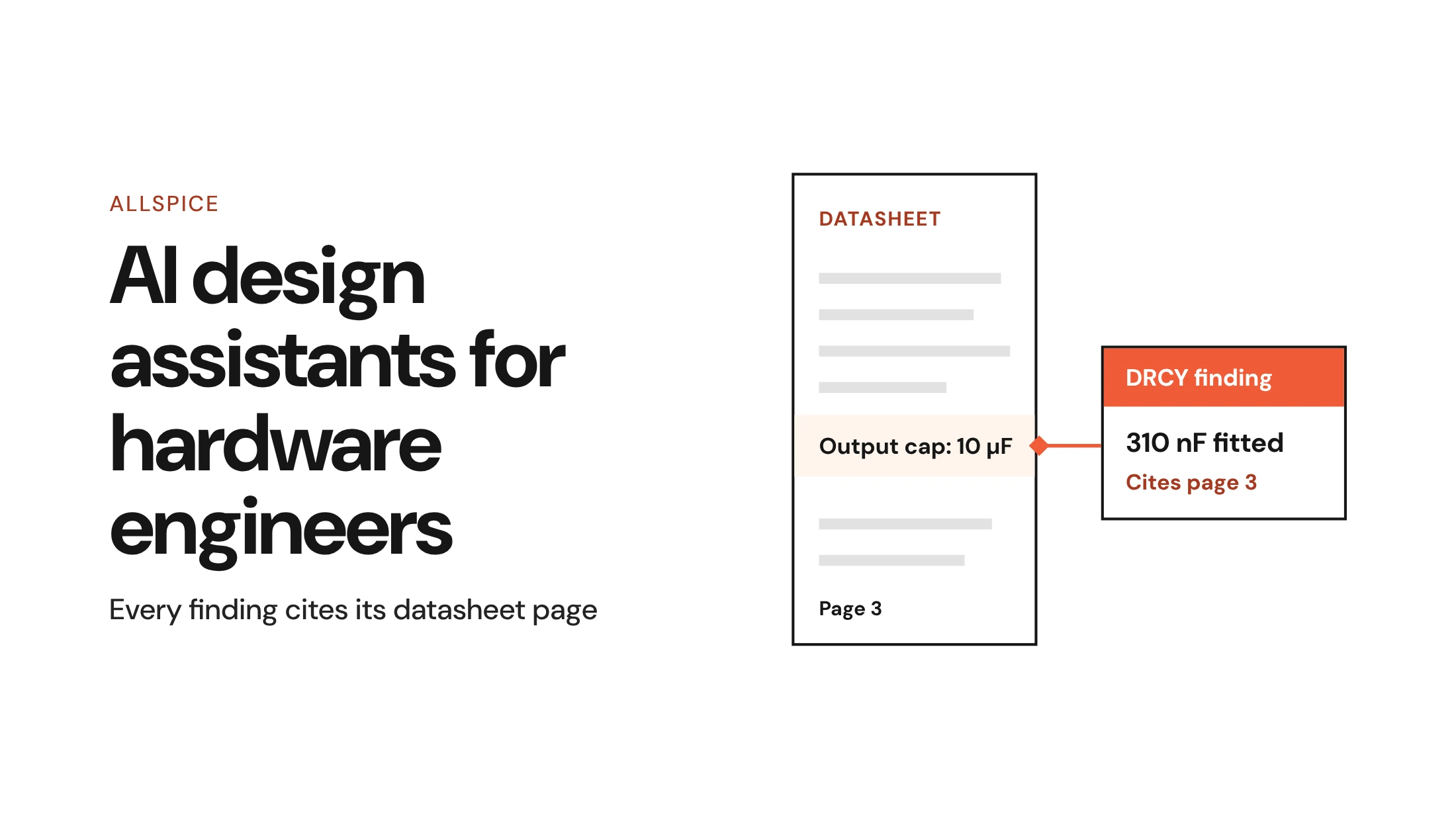
One schematic used 310 nF where the datasheet called for 10 µF on page 3. The finding cited that page, so checking it meant opening one PDF to one table.
Another finding involved a capacitor wrong for a roughly 100 ns time constant. Catching that takes arithmetic against the intended timing. The assistant does the calculation instead of judging the value by eye.
Connections that look right on one page
Swapped JTAG pins look fine on a schematic, because every net connects to something. The error only appears when you compare the connector pinout against the processor's datasheet.
A floating regulator enable pin is similar. The symbol is complete, yet the enable pin has no defined state.
Errors that only exist between pages
The same net name used for two different nets on different sheets is invisible on any single sheet. Reviewers usually walk a design one page at a time, and every page looks correct. An assistant that reads the whole design sees both uses at once.
Why traceable evidence matters more than a smarter model
Any AI assistant will sometimes be wrong. The same McKinsey survey found "nearly one-third of all respondents reporting consequences stemming from AI inaccuracy."
Better models help, but no model is right every time. Evidence changes what a wrong answer costs: when each finding cites the datasheet page behind it, an engineer checks the reasoning instead of trusting the verdict.
Allspice does not claim zero false positives for DRCY. The goal is higher signal-to-noise, and you should measure it on your own board. A wrong finding can still prompt an engineer to look closer and find a real mistake nearby.
For data handling, DRCY can be self-hosted and run on your own models with your own tokens.
What an AI design assistant does not do
DRCY reviews schematics. It does not review layout just yet, so trace widths, clearances, impedance, thermal relief and DFM stay with your layout tools and reviewers.
The assistant is also not a sign-off authority. It produces findings, and a named engineer still approves the design. For a longer look at scope, read what AI review catches and where it stops.
How to bring an AI design assistant into your design review
An AI design assistant works best inside the design review you already run. The steps below assume an established review process at a mid-size or large hardware organization.
1. Run the first pass before human review
Run the assistant on the design review before the change lands. Senior reviewers then start from a shorter list. Their time goes to architecture and trade-offs, while the assistant handles the exhaustive datasheet cross-checks.
Timing matters as much as coverage. A finding raised before human review costs a comment, while the same finding raised after release costs an ECO. The Allspice walkthrough shows how to run an AI design review on a real design.
2. Give it design intent
An assistant reads parts well. It reads intent only when you supply it.
Upload the spec and state the voltage of every rail. Then describe intent for any block that breaks a usual rule on purpose.
Net names carry less than they seem to. A net called V-BAT tells a human it carries the battery, but it does not say what voltage that battery is. Stated intent also cuts noise, because every finding about a deliberate choice is one more finding someone has to dismiss.
3. Triage findings by evidence first
DRCY findings are built to be checked fast. Allspice's guide on how to triage an AI finding is the reference, and the short version follows.
- Read the audit summary first: Missing active-component datasheets can make a review incomplete, so check coverage before any finding.
- Check each finding in order: Look at location, claim, reasoning and cited datasheet evidence, and read the evidence before judging the verdict.
- Reply when the conclusion is wrong: If the observation is valid but the conclusion is wrong, reply to DRCY with the missing context.
- Thumbs down only for design errors: Use thumbs down only when a finding is wrong about the design.
- Use passes for large sets: Triage in three passes, by evidence, by circuit, then by consequence.
4. Count the results on your own board
Before you trust any assistant, test it on a design you know. Seed errors you can list into a finished design, then run the review.
Count the planted errors it finds and the findings that turn out to be noise. That ratio is your signal-to-noise, measured on your own circuits. In one customer test, DRCY also found an error the team had not planted.
A vendor demo can't give you that number. Allspice has a guide to evaluating AI review tools that covers this test in more detail.
What makes a good AI design assistant
A good AI design assistant reads every datasheet in the design, does the arithmetic, and cites the page behind each finding. It does not replace a senior engineer. Engineers keep the judgment, including which findings matter and when a design is ready.
Footprint validation is in progress, and scope will expand. The requirement stays the same: every finding should trace back to a cited datasheet page.
FAQs
Can our AI design assistant review PCB layouts?
No. DRCY reviews schematics only. Trace widths, clearances, impedance, thermal relief and DFM stay with your layout tools and reviewers. Footprint validation is in progress.
Will an AI design assistant replace hardware design reviewers?
No. It performs the first pass, reading every datasheet and flagging likely errors before human review. Senior reviewers start from a shorter list and still sign off on the design.
How do I know if an AI design review finding is correct?
Open the datasheet page the finding cites, then check location, claim, reasoning and evidence in that order. If the observation holds but the conclusion is wrong, reply to the finding to let the AI know how to interpret it next time.