AI readiness criteria for hardware engineering tools (weigh them at your next decision point)
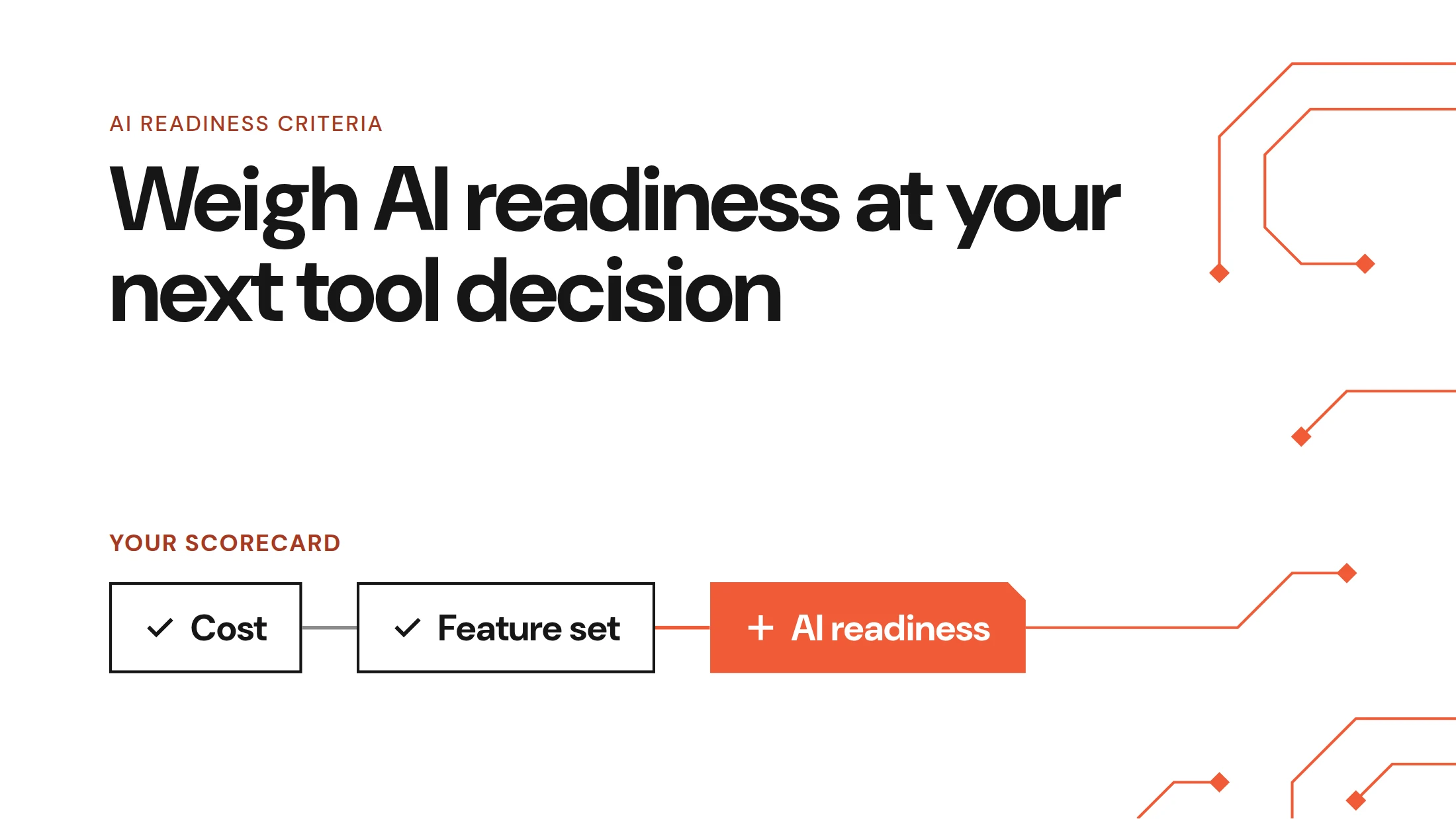
You don't need to switch hardware engineering tools to get ready for AI. At your next decision point (a renewal, an expansion, a new team, or an acquisition integration), weigh AI readiness criteria alongside cost and feature set. A tool is AI-ready when AI can reach your native design data and your engineers can check every output against its source.
Key takeaways
- Renewals, expansions, new teams, and acquisition integrations are when leadership has real room to change price, terms, contract length, and the system of record.
- AI readiness comes down to whether AI can reach your native design data and whether your engineers can check its output against the source.
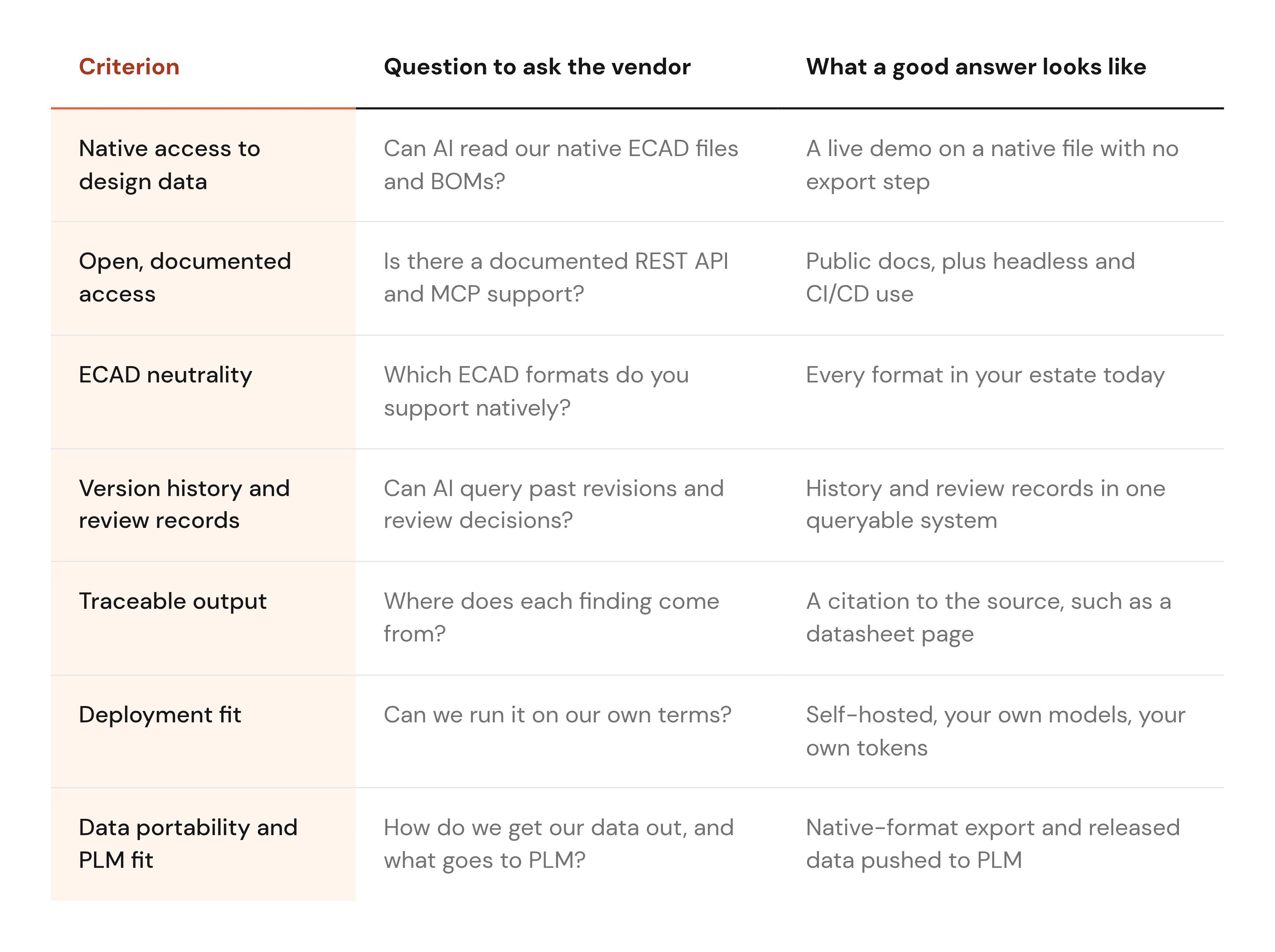
- The seven criteria are native data access, open APIs and MCP, ECAD neutrality, usable history, traceable output, deployment fit, and data portability with PLM.
- Score AI readiness in the same scorecard as cost and feature set, so it can decide a close call without overriding the basics.
Tooling choices come up whether or not you're shopping
Most hardware teams aren't actively shopping for tools. Even so, cost reviews and new needs keep sending someone to look for a better option or a way to save money.
Software costs keep that search going. Gartner research on SaaS costs finds that "Enterprise SaaS costs are rising, often increasing by 10% to 20% or more during contract renewal." Zylo, a SaaS management vendor, reports in Zylo's 2026 SaaS Management Index that "61% cut projects due to unplanned SaaS cost increases."
Both figures cover software spend in general, so treat them as context for ECAD and PLM budgets. The pattern matches what engineering leaders tell us. Some expect a tooling change next year, and others have budget to evaluate AI tools but no recurring line item to keep paying for one.
An important decision, then, is what you do at your next tooling decision point. Renewal, expansion, new team, acquisition integration: these are the moments leadership actually has room to negotiate.
Switching tools now is optional. When you next have a choice, here are the AI readiness criteria to weigh, alongside cost and feature set.
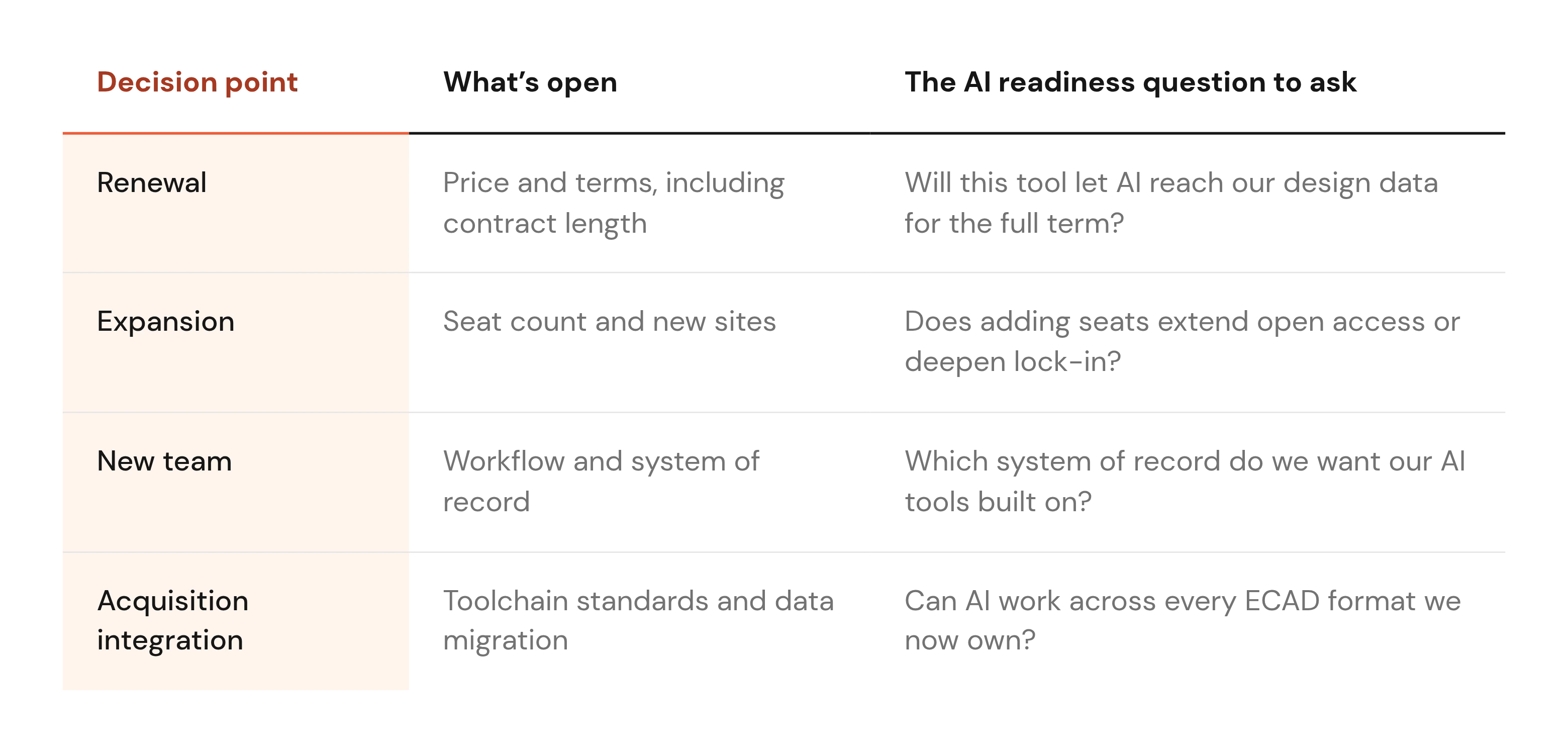
The decision points where you actually have room to choose
Most guidance on AI readiness assumes a greenfield purchase. In mid-size and large hardware organizations, tools change at a few predictable moments, and each one opens something different.
Renewal
Renewal is when price and terms get reset. Gartner's figure above shows why buyers pay attention: SaaS costs often rise 10% to 20% or more at that point.
Contract length matters as much as price, because a three-year term commits you to the vendor's AI roadmap for three years. Ask what the tool lets AI do today, in writing. A documented API is a stronger answer than a roadmap slide.
Expansion
Adding seats or sites multiplies whatever lock-in the tool already carries. If design data only leaves the tool as PDFs today, that stays true for every engineer you add.
Expansion is also a pricing conversation, so ask for any API access or deployment options the original contract lacked.
New team
A new team has no legacy workflow to unwind, which makes it the cheapest moment to set the system of record.
Decide where native files and review records will live before the first board ships. The AI tools your engineers adopt in two years will depend on what that system exposes.
Acquisition integration
Acquisitions bring mixed ECAD estates. One group designs in Altium, another in Cadence or OrCAD, and a third keeps its KiCad libraries.
Standardizing everyone on one vendor means migrating designs and rebuilding libraries, which is expensive and slow. We haven't found a reliable public figure for that cost, so treat this as our reasoning. A tool that works across every format you now own lets AI see the whole estate.
What "AI-ready" means for a hardware tool
AI is only as useful as the design data it can reach and the evidence it can show. Gartner's AI-ready data prediction, published in February 2025, says that "through 2026, organizations will abandon 60% of AI projects unsupported by AI-ready data."
Value is uneven even where AI is already in use. In McKinsey's State of AI 2025, "Thirty-nine percent of respondents attribute any level of EBIT impact to AI." The same report ranks workflow redesign among the strongest contributors to business impact.
Neither source looks at hardware tools, so the seven criteria below are Allspice's view. We've explained why AI needs design intent: a PDF export strips out the nets and history AI needs to reason about a design.
1. Native access to design data
Can AI read native ECAD files and BOMs directly, with their history, or only PDFs and exports? Every export step adds a manual handoff and a copy that drifts from the source.
Ask the vendor to show AI working on a native file. DRCY, for example, reads native ECAD files and datasheets directly, with no export step or intermediate format.
2. Open, documented access for AI and automation
Your AI tools will change faster than your design tools. A documented REST API, Model Context Protocol (MCP) support, headless operation, and CI/CD hooks let you plug in whatever comes next.
Open standards for this exist, and MCP moved to a vendor-neutral home in December 2025. The announcement of the Linux Foundation's Agentic AI Foundation describes MCP as "the universal standard protocol for connecting AI models to tools, data and applications."
That describes the general AI ecosystem, so ask each hardware vendor directly whether they support it. Some prospects ask us for API-only, headless access to DRCY so it runs inside their own pipelines.
3. ECAD neutrality
A tool tied to one ECAD vendor covers only the designs made in that vendor's tool. After an acquisition, that can be a shrinking share of your work.
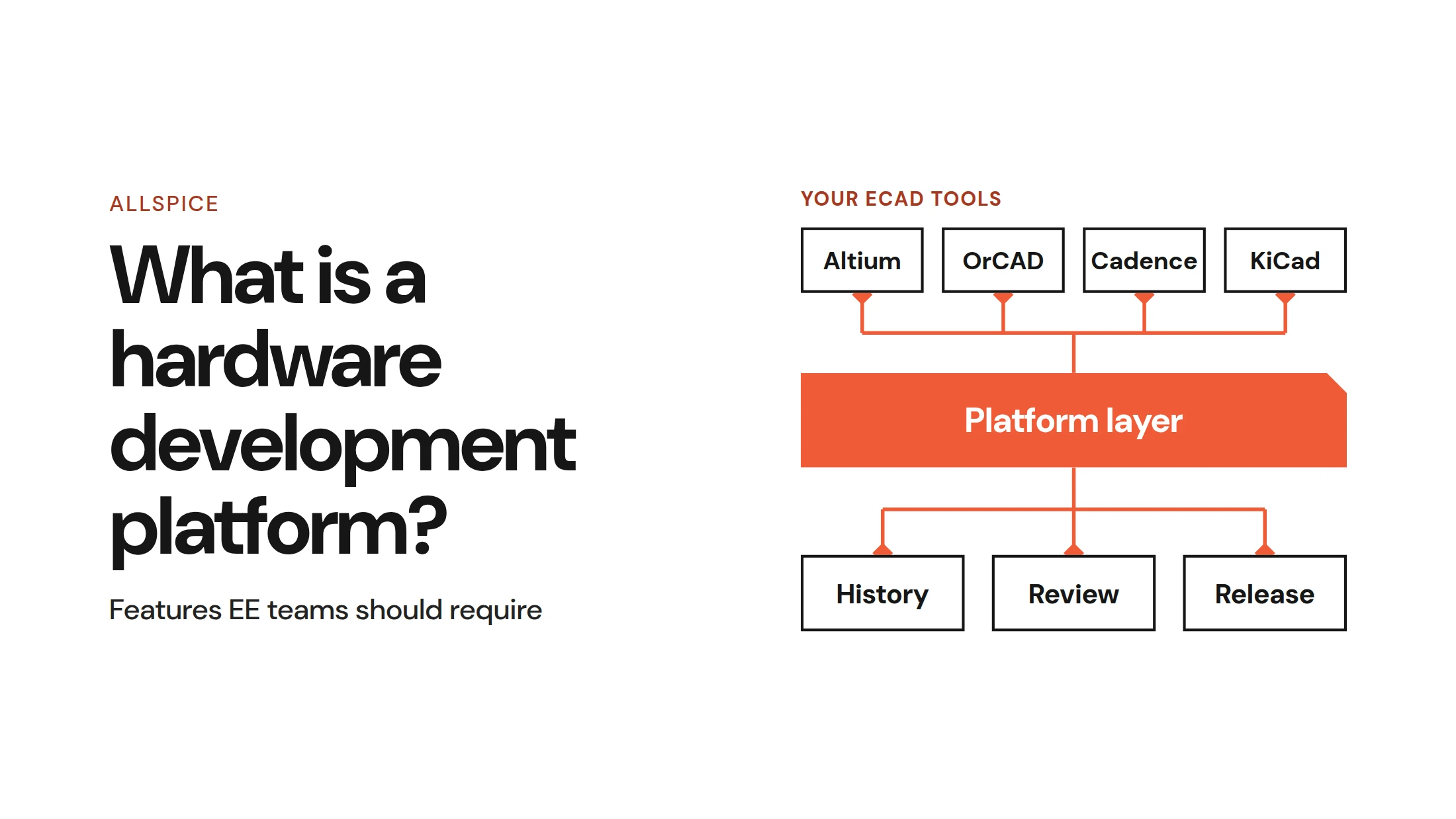
Look for native support across the formats you actually run, such as Altium, Cadence, OrCAD, and KiCad. Neutrality also keeps a future ECAD change from stranding your review history and automations.
4. Version history and review records AI can use
Good review depends on context: what changed between revisions and what the last design review flagged or waived. AI needs the same context, so the tool should keep history and review decisions in a form AI can query.
Corrections should persist too. When an engineer marks a DRCY finding as wrong for a stated reason, that correction carries into later reviews instead of resurfacing every time.
5. Traceable, checkable output
Engineers check AI findings before acting on them, so every finding should cite its source. In DRCY, each finding cites the datasheet page it came from, and the reviewer can open that page and check the claim.
Expect some false positives from any AI tool. Ask how the vendor raises signal-to-noise, then verify it on your own board. Our breakdown of what AI design review catches covers where the limits sit.
6. Deployment that matches your constraints
For many mid-size and large hardware organizations, where design data lives is the first question, ahead of what AI can do with it. Self-hosting is the capability prospects ask us about most often.
With Allspice, the answer is self-hosted, your own models, your own tokens. We've laid out the on-prem ECAD hosting tradeoffs in a separate post.
7. Data portability and fit with PLM
Ask how you get your data out, in native formats, if you stop using the tool. An engineering leader at a hardware company asked us exactly that, and it's the right question at renewal.
Then check how the tool fits with PLM. Work in progress changes constantly, so a good tool pushes released data to PLM and keeps daily churn out of it. Our ECAD PLM integration approach explains the reasoning.
How to weigh AI readiness alongside cost and features
AI readiness belongs in the evaluation you already run. These four steps keep it in proportion.
1. Put it in the same scorecard
Add the seven criteria as rows next to price and feature set, and weight them with the same discipline. A shared scorecard lets AI readiness settle a close decision without overriding a clear one.
2. Test on your own design
Pick a real board from your archive, ideally one with known bring-up issues. Run the tool, sort the findings yourself into real issues and noise, and check what it missed.
A known error, such as a 6.3 V capacitor on a 5 V rail, makes a useful test. Engineering managers are usually best placed to choose the board, since they know which past issues slipped through.
3. Ask what the tool doesn't do
Ask every vendor where the tool stops. A clear scope answer is a good sign, and a vague one usually hides a gap.
We'll go first. DRCY reviews schematics. It does not review layout, so trace widths and clearances stay with your layout checks.
4. Price the cost of staying closed
A lower sticker price can cost more over a contract term if the tool blocks AI access to your design data. You pay in manual exports and in AI pilots that stall for lack of usable data.
Put a rough number on that for each option before you sign. We cover the leadership side in questions before approving AI tools.
Where Allspice fits
Allspice is an ECAD-agnostic revision control system built for hardware, and it works as the system of record for design data. Teams push native Altium, Cadence, OrCAD, and KiCad files and get native file diffs, Design Reviews, Automations, and Releases.
The Allspice hardware collaboration platform also exposes that data through a REST API and MCP for your own AI tools and pipelines. AI design reviews with DRCY run on the same data, giving each schematic a first pass with findings traced to datasheet pages.
Many customers value revision control on its own, before any AI. Several rate it above the AI, and one described AI as a bonus on top.
Use the choice you already have
You don't need to rip and replace anything to prepare for AI. The next renewal, expansion, new team, or acquisition is coming anyway, and each one reopens the choice.
When it does, put AI readiness in the scorecard next to cost and feature set. It's one criterion among several, and it doesn't guarantee results. McKinsey's survey ranks workflow redesign among the strongest contributors to impact.
What it does is keep your next tool from closing a door you'll want open in two years.
FAQs about AI readiness criteria for hardware engineering tools
What makes an engineering tool AI-ready?
An engineering tool is AI-ready when AI can reach its native design data and engineers can check what AI produces. In practice, that means native file access, a documented API or MCP, ECAD neutrality, usable history, traceable output, deployment fit, and data portability.
Should we switch hardware tools to get AI features?
Usually there's no need to switch mid-contract. In our view, the better move is to add AI readiness criteria at your next renewal, expansion, new team, or acquisition. Weigh them alongside cost and feature set.
What technical infrastructure is needed before deploying AI in hardware engineering?
You need a system of record that holds native design files and their review history. It also needs open access through a REST API or MCP, and deployment that fits your constraints: self-hosted, your own models, your own tokens.
How do we test an AI tool on our own terms?
Run it on a real board from your archive, ideally one with known bring-up issues. Sort the findings yourself and check each citation against its source. Then ask the vendor to state what the tool doesn't cover.

.webp)